
TransLoc
TransLocMaps & Navigation
3.2788.00 Reviews
- Version
- 5.4.2
- Installs
- 500.00K
- Age Rating
- Everyone
Screenshots
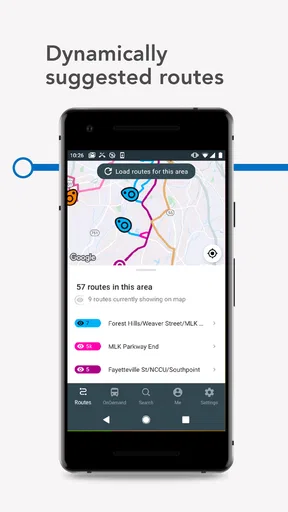
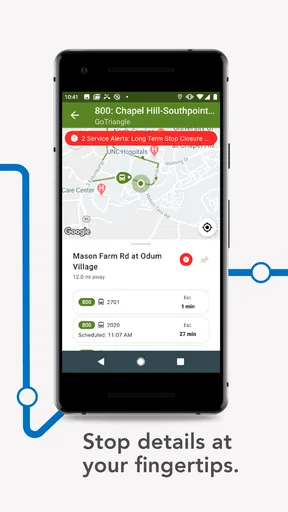
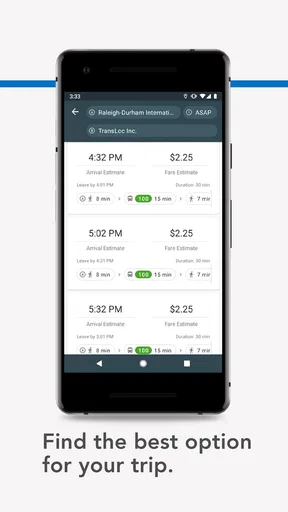
Our Review of TransLoc
 Analysis by Appyee
When I need to catch a bus without standing at a stop guessing, TransLoc is the kind of app I want open on my phone. It belongs to the Maps & Navigation category and focuses on a very specific job: showing bus arrival information and, where the local bus agency supports it, letting riders request a ride. That narrow purpose is both its appeal and its main limitation. It can be genuinely useful during a daily commute, but it is not a complete replacement for every mapping or trip-planning tool.
I reviewed it with a practical question in mind: can I trust it enough to make a real travel decision? My answer is cautiously positive, provided I treat the arrival display as a live aid rather than an absolute promise. The app is free, rated for Everyone, and developed by TransLoc. Its current version is 5.4.2, and it runs on Android 7.0 or later. Those details make it approachable for people using older phones, although the experience still depends heavily on whether their bus agency is connected to the service.
What using TransLoc feels like in everyday travel
The first thing I noticed is that this is not trying to be a giant all-purpose travel platform. Its identity is tied to participating bus systems. That matters because the app’s usefulness starts before the first tap: I need to be in an area served by an agency that appears in TransLoc. If that condition is met, the app can turn a vague wait into a more informed decision. Instead of leaving home because the timetable says a bus should be coming, I can check the service and decide whether to walk slowly, wait a little longer, or head toward the stop now.
A realistic example is a morning trip to work or class. I might be ready ten minutes before departure, but weather or a delayed connection can make that extra time important. I would open TransLoc, look for the relevant stop or route, and use the arrival information to judge whether I have time to finish breakfast or need to leave immediately. That is a small convenience, but it is exactly the kind of small convenience that makes a transit app worth keeping.
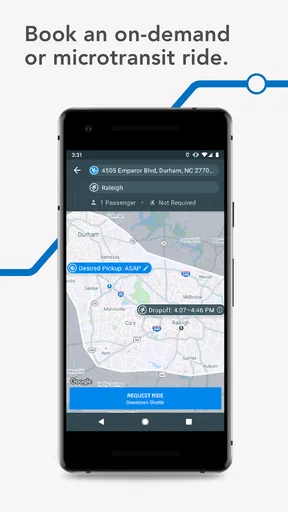
The ride-request option gives the app a different role in supported systems. It is not simply a map showing lines on a screen; in some locations, it can act as a bridge between checking service and requesting transportation. I would not assume that every city offers the same experience, because the bus agency determines what is available. Still, the combination is useful for people who regularly move between fixed-route service and agency-supported ride options.
One practical habit makes the app more dependable: I check the displayed arrival before walking to the stop, then check again when I am close to leaving. A single glance too early can become outdated, especially when traffic or operations change. This is not a criticism unique to TransLoc; live transit information is only valuable when it reflects the current situation. The app works best as a decision tool used at the moment I need it, not as a timetable I inspect once and blindly follow all day.
Where its focused design helps
For a regular rider, the focused approach can be easier than opening a general map and searching through walking directions, driving routes, train lines, and businesses. TransLoc is relevant when my concern is the bus: is it approaching, and can I request a ride through the connected agency? That directness reduces the number of steps between opening the app and answering the question that matters.
It can also be helpful for people who are still learning a local bus network. A newcomer may know the destination but not yet understand which stop is safest or which route normally arrives first. Live arrival information gives the rider something more useful than a static schedule alone. I still recommend checking the route direction carefully, because a nearby stop can serve buses traveling in opposite directions. The app can provide information, but I remain responsible for confirming that the selected service actually goes where I need.
Another less obvious use is deciding whether a short walk is worthwhile. If the nearest stop has a long wait while another stop a few minutes away shows an approaching bus, the live view can help me compare those choices. That trade-off is especially useful when I am carrying luggage, traveling with a child, or trying to avoid an unnecessary wait. I would still allow extra time rather than sprinting based on a tight estimate.
Trust starts with knowing what the app can and cannot promise
The app’s public profile gives it a modest but established presence: it has passed half a million installs and holds a 3.2 average from about 1.8 thousand ratings. I read that as a mixed signal rather than a simple recommendation or warning. Enough people use it for the service to be familiar, but the average suggests that the experience is not equally smooth for everyone. In a transit app, disappointment can come from agency coverage, stale arrival information, or a local implementation that does not behave as expected.
That is why I would not judge trust only by the interface. The important question is whether the information is useful in the specific transit network I ride. A polished screen cannot compensate for missing routes or unreliable updates. Before depending on it for an important appointment, I would test it on a normal trip and compare what it shows with buses I can actually see arriving. That quick personal check tells me more than a general reputation score.
TransLoc is also not the right choice if I need a broad door-to-door planner across many transportation modes. A standard mapping app may be better when I need walking directions, driving alternatives, cycling routes, or a mix of rail and bus connections. A dedicated regional transit app may also offer deeper information for one city. I see TransLoc as a focused companion for supported bus service, not as the only navigation tool on my phone.
Controls, data-sensitive moments, and user choice
I find that the most useful way to assess TransLoc is to separate looking up a bus from taking an action through the app. I check the route and direction first, then decide whether I only need arrival information or whether a ride request is relevant. That small pause helps me avoid treating a useful estimate as a guarantee, and it leads naturally to the choices I make before relying on any app during a trip.
What I look for before relying on an app
When I evaluate a navigation app, I separate visible usefulness from assumptions about privacy. Seeing a bus arrival does not automatically tell me how the app handles personal information, and I do not fill in those gaps with guesses. I pay attention to the choices presented on the device, the account steps requested, and whether the app lets me use its core function without handing over more information than seems necessary for that task.
For TransLoc, the most important trust moment is when I move from browsing service information to requesting a ride. Those are not identical activities. Checking a bus arrival is a passive information task; requesting transportation is an active action that may require additional details or confirmation. I would slow down at that point, read every screen, check the pickup location, and make sure I understand what I am submitting before confirming.
This distinction is useful because it prevents accidental requests. If I am only checking whether a bus is close, I do not need to treat the ride-request function as part of every normal search. I would use the information view for routine planning and enter the request flow only when I genuinely need that service. Keeping those actions separate gives me better control over what I am doing.
Account decisions and visible user agency
People often ask whether they must create an account immediately, whether a ride request can be changed, or whether the app can be used only for arrival information. The sensible approach is to inspect the first-run and request screens rather than assume all agencies configure TransLoc in the same way. The local operator can shape the available workflow, so I would read the prompts and avoid accepting an action simply to move faster through setup.
My preferred workflow is simple. I first explore the available transit information, then check whether the relevant route and stop are present, and only afterward consider any account or request step. If the app asks for a permission or detail that is not clearly connected to the action I want, I pause and decide whether I am comfortable continuing. That is not needless caution; it is a useful habit with any app that can influence a real-world trip.
I would also review the phone’s permission controls after installation and again after an update. The current version is 5.4.2, but an app can change over time, and operating systems can present permission choices differently. I do not assume that an update has changed anything specific; I simply prefer to verify what is visible on my own device. If I only need basic arrival information, I keep my choices limited to what the app clearly needs for that use.
There is a practical trade-off here. More personalized or location-aware behavior can make transit information faster to access, while more manual searching can preserve a greater sense of control. I usually start with manual selection of the agency, route, or stop when that is available. Once I understand the app’s behavior, I can decide whether convenience is worth enabling additional device access. The key is that the choice should be mine, not an automatic reflex during setup.
Three habits that make the service more dependable
First, I verify the agency before planning a time-sensitive trip. If the local network is not represented in the app, no amount of searching will turn it into a reliable planner for that journey. I would keep a second source available for unfamiliar cities, especially when I need connections beyond the bus service shown in TransLoc.
Second, I use arrival information together with the stop name and route direction, not the arrival estimate alone. This avoids a common mistake: seeing a bus arrive soon and boarding it without checking whether it is traveling toward the intended destination. The extra glance takes seconds and can prevent a much longer detour.
Third, I treat ride requests as commitments that deserve a final review. Before submitting, I check the pickup point, the selected service, and any instructions shown on screen. If plans change, I return to the relevant control rather than assuming that closing the app cancels anything. I do not rely on an action being undone merely because I navigated away from the screen.
These habits are not flashy features, but they are where the app becomes more useful in real life. They also protect me from confusing information with action. Looking up a bus and requesting a ride are different levels of involvement, and using the app carefully means recognizing that difference.
Who should use it, and who should choose another tool?
I would recommend TransLoc to a rider whose bus agency is supported and who mainly wants quick arrival information. It is particularly suitable for a daily commuter, student, or occasional rider who wants to reduce uncertainty at the stop. The free price removes an obvious barrier, and the Everyone content rating makes it approachable for a broad audience. Its compatibility with Android 7.0 or later also means that owners of older Android phones may be able to use it.
I would be more cautious about recommending it as a sole travel solution. Someone planning a complicated trip across several modes may prefer a general navigation app with broader route coverage. A visitor who does not know which local agency operates the buses may find the first step less straightforward than in a citywide maps product. And anyone who cannot tolerate uncertainty should still allow buffer time, because live arrival information supports a decision but does not eliminate delays.
The app is also a weaker fit for a person who expects every transit system to offer identical tools. The ride-request capability depends on the participating bus agency, so the value can vary from one place to another. I would not install it expecting a universal on-demand service. I would install it after confirming that it is relevant to the network I actually use.
My cautious verdict after weighing convenience and control
TransLoc succeeds when I use it for its real strength: checking supported bus service at the point when I need to decide whether to leave, wait, walk, or request transportation. Its focused purpose is more useful than a broad feature list for a regular bus rider. The app’s established reach, free access, and support for older Android versions make it easy to try without much commitment.
At the same time, the 3.2 average rating is a reminder to keep expectations grounded. I would test the app against my own routes before trusting it for an airport connection, an exam, a medical appointment, or the last bus of the evening. If the displayed information consistently matches what happens on the street, it can earn a place in my routine. If coverage or updates prove unreliable, I would switch to the local agency’s preferred tool or a broader navigation alternative.
My final recommendation is therefore conditional but clear: use TransLoc as a focused bus companion, not as a universal guarantee of arrival. Check the agency, confirm the route direction, review any ride request before submitting it, and keep control of the permissions and account choices shown on your phone. For the right transit network, that careful approach turns a simple arrival app into a practical everyday aid. For travelers needing comprehensive multimodal planning, another navigation option will likely serve them better.
Verdict
Strengths of TransLoc
- Real-time vehicle tracking helps reduce uncertainty at stops.
- Clear route maps make it easier to understand transit coverage.
- Stop alerts can help riders avoid missing their connection.
- Useful for comparing nearby routes and departure times.
- Supports more confident trip planning in unfamiliar areas.
Limitations of TransLoc
- Coverage depends on whether local agencies support TransLoc.
- Vehicle locations may occasionally lag behind actual movements.
- Some routes may show limited schedule or arrival information.
- The interface can feel inconsistent between different transit systems.
- It may use location data and require permissions for certain features.
Similar Picks in This Category
View All
Uber - Request a ride
Uber Technologies, Inc.4.7


inDrive. Rides with fair fares
® SUOL INNOVATIONS LTD4.8

Yandex Go: Taxi Food Delivery
Mikromobilnost LLC Belgrade4.8

Bolt: Request a Ride
Bolt Technology4.8

Rapido: Bike-Taxi, Auto & Cabs
Rapido Bike Taxi4.8
Frequently Asked Questions
What is TransLoc and what can I use it for?
TransLoc is a public transportation app designed to help riders find nearby transit services, check routes, view stops, and follow vehicle locations when real-time data is available. It can be useful for planning daily commutes, campus travel, or trips through participating transit systems. The exact features and coverage depend on the agency supported in your area.
Does TransLoc provide real-time bus or shuttle tracking?
Yes, TransLoc can display real-time vehicle locations and estimated arrival information for participating transit agencies. However, not every route or operator provides live data, and occasional delays may occur because information depends on GPS signals and updates from the transit agency. Before relying on an estimate, it is sensible to compare it with posted schedules and stop information.
Is TransLoc available in every city or for every transportation agency?
No. TransLoc only works with transit agencies, universities, campuses, and shuttle services that use or support its platform. When you open the app, available services generally depend on your selected location and the participating operators nearby. If your local bus or train provider is not listed, the app may offer limited information or may not be useful for your regular journeys.
Does TransLoc require location access, mobile data, or an account?
TransLoc can use your device location to identify nearby agencies, stops, and routes, although you may be able to search for locations manually if you prefer not to grant permission. Mobile data or Wi-Fi is normally required for live arrivals, map updates, and service alerts. Some features may be accessible without an account, but availability can vary by agency and app version.
Can I depend on TransLoc for accurate arrival times and service alerts?
TransLoc is helpful for checking current transit conditions, but arrival times and alerts should be treated as estimates rather than guarantees. Accuracy depends on the transit agency’s data, vehicle GPS coverage, traffic, connectivity, and how quickly disruptions are reported. For important appointments, allow extra travel time and verify major cancellations or schedule changes through the official transportation provider when possible.
